
Get a Mailbox Delegation Report
Easy-to-Use Exchange Online Mailbox Permissions Reporting
Find All the Delegates of a Mailbox with EAC
In Exchange Admin Center (EAC) you can view Mailbox delegation permissions by clicking each mailbox. That can will do the job until you need to view permissions of multiple mailboxes. Unfortunately, the EAC interface is not designed to view multiple mailboxes’ permission at a time.
Then the next option is to use PowerShell.
Use PowerShell to Extract Mailbox Delegation Permissions
Microsoft Exchange provide the Get-MailboxPermission and Get-RecipientPermission cmdlets that can be used to query the permissions on a mailbox in Exchange on-premise and Exchange Online. However, the syntax of commands may differ depending on the environment. At the end of the day you need a script to only retain the information required, without the SELF permissions and inherited permissions you are not concerned about. For example, one script would retrieve all on-premise mailboxes with permissions granted to other users to Send On Behalf while another one would let you export Office 365 Mailbox Permissions Report to CSV.
This is all good but remains one serious problem, how are you going to send an individual report to each single user with information concerning them?
Get Non-Owner Permissions with Promodag Reports
Promodag Reports includes a report that can help you achieve this task: Recipient Delegate Permissions.
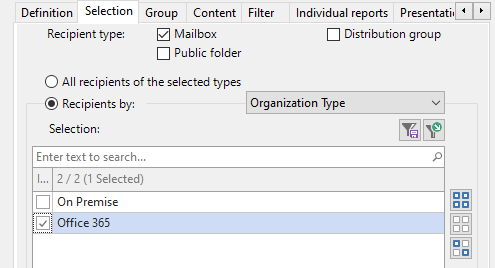
First and foremost, it works for both on-premise and Office 365 environments: no more worries about scripts and command syntax, the tool supports all on-premise versions of Exchange from 2007 to 2019 along with Exchange Online.
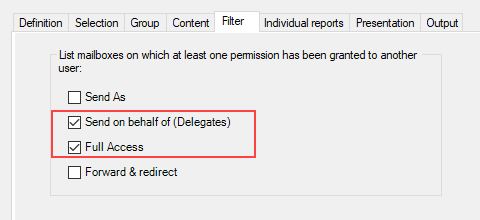
Secondly, the user-friendly interface allows to select the permissions you need to report on:
| Permission | What the delegate is allowed to do |
| Full Access | Open this mailbox and behave as the mailbox owner |
| Send As | Send email from this mailbox. The message will appear to have been sent by the mailbox owner |
| Send on behalf | Send email on behalf of this mailbox. The From line in any message sent by a delegate indicates that the message was sent by the delegate on behalf of the mailbox owner |
You can also list mailboxes on which a Deliver and Redirect server-side rule is enabled.
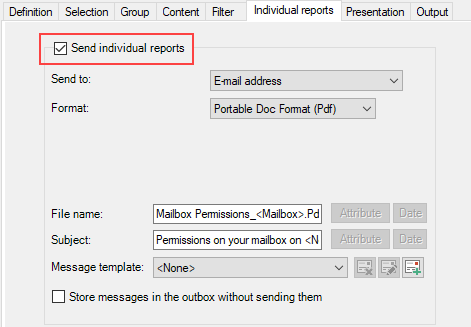
The most interesting feature is that you can automatically generate an individual report for each user, and have it emailed to them! You can respond to your boss’ request in a few clicks. Problem solved.
A new article about our Permissions on Mailbox Folders report is on the way. Stay tuned!
Stay on Top of Permission Audit with Our Exchange Reporting Tool
Try Promodag Reports with a 45-day free trial or upgrade to the latest version if you’re already a customer. If you have any comments or suggestions, tell us in the comments or contact our support.
# Import Exchange Management Shell (if not already loaded)
Add-PSSnapin Microsoft.Exchange.Management.PowerShell.SnapIn -ErrorAction SilentlyContinue

# Initialize results array
$results = @()

# Get all mailboxes
Write-Host "Retrieving all mailboxes..." -ForegroundColor Cyan
$mailboxes = Get-Mailbox -ResultSize Unlimited

# Counter for progress
$counter = 0
$totalMailboxes = $mailboxes.Count

foreach ($mailbox in $mailboxes) {
    $counter++
    Write-Progress -Activity "Processing Mailboxes" -Status "Processing $($mailbox.DisplayName)" -PercentComplete (($counter / $totalMailboxes) * 100)

    # Check if GrantSendOnBehalfTo has any values
    if ($mailbox.GrantSendOnBehalfTo -ne $null -and $mailbox.GrantSendOnBehalfTo.Count -gt 0) {

        foreach ($delegate in $mailbox.GrantSendOnBehalfTo) {
            # Get delegate details
            try {
                $delegateUser = Get-Mailbox $delegate -ErrorAction SilentlyContinue
                if ($delegateUser -eq $null) {
                    $delegateUser = Get-User $delegate -ErrorAction SilentlyContinue
                }

                $delegateName = if ($delegateUser) { $delegateUser.DisplayName } else { $delegate.ToString() }
                $delegateEmail = if ($delegateUser.PrimarySmtpAddress) { $delegateUser.PrimarySmtpAddress } else { "N/A" }

                $results += [PSCustomObject]@{
                    MailboxName = $mailbox.DisplayName
                    MailboxEmail = $mailbox.PrimarySmtpAddress
                    MailboxType = $mailbox.RecipientTypeDetails
                    DelegateName = $delegateName
                    DelegateEmail = $delegateEmail
                    PermissionType = "Send On Behalf"
                }
            }
            catch {
                Write-Warning "Error processing delegate $delegate for mailbox $($mailbox.DisplayName): $_"
            }
        }
    }
}

Write-Progress -Activity "Processing Mailboxes" -Completed

# Display results
Write-Host "`nTotal mailboxes with Send On Behalf permissions: $($results.Count)" -ForegroundColor Green

# Export to CSV
$exportPath = "C:\Temp\SendOnBehalf_Permissions_$(Get-Date -Format 'yyyyMMdd_HHmmss').csv"
$results | Export-Csv -Path $exportPath -NoTypeInformation -Encoding UTF8

Write-Host "Results exported to: $exportPath" -ForegroundColor Green

# Display summary
$results | Format-Table -AutoSize
# Check if connected to Exchange Online
try {
    Get-OrganizationConfig -ErrorAction Stop | Out-Null
    Write-Host "Connected to Exchange Online" -ForegroundColor Green
}
catch {
    Write-Host "Not connected to Exchange Online. Connecting..." -ForegroundColor Yellow
    Connect-ExchangeOnline
}

# Initialize results array
$allPermissions = @()

# Get all mailboxes
Write-Host "`nRetrieving all mailboxes..." -ForegroundColor Cyan
$mailboxes = Get-EXOMailbox -ResultSize Unlimited -Properties DisplayName, PrimarySmtpAddress, RecipientTypeDetails, GrantSendOnBehalfTo

Write-Host "Found $($mailboxes.Count) mailboxes" -ForegroundColor Green

# Counter for progress
$counter = 0
$totalMailboxes = $mailboxes.Count

foreach ($mailbox in $mailboxes) {
    $counter++
    Write-Progress -Activity "Processing Mailbox Permissions" -Status "Processing $($mailbox.DisplayName) ($counter of $totalMailboxes)" -PercentComplete (($counter / $totalMailboxes) * 100)

    # 1. Get Full Access Permissions
    Write-Verbose "Checking Full Access permissions for $($mailbox.DisplayName)"
    $fullAccessPerms = Get-EXOMailboxPermission -Identity $mailbox.PrimarySmtpAddress |
        Where-Object { $_.User -notlike "NT AUTHORITY\SELF" -and $_.User -notlike "S-1-5-*" -and $_.IsInherited -eq $false -and $_.AccessRights -contains "FullAccess" }

    foreach ($perm in $fullAccessPerms) {
        $allPermissions += [PSCustomObject]@{
            MailboxName = $mailbox.DisplayName
            MailboxEmail = $mailbox.PrimarySmtpAddress
            MailboxType = $mailbox.RecipientTypeDetails
            DelegateName = $perm.User
            PermissionType = "Full Access"
            AccessRights = ($perm.AccessRights -join ", ")
            AutoMapping = $perm.AutoMapping
            IsInherited = $perm.IsInherited
        }
    }

    # 2. Get Send As Permissions
    Write-Verbose "Checking Send As permissions for $($mailbox.DisplayName)"
    $sendAsPerms = Get-EXORecipientPermission -Identity $mailbox.PrimarySmtpAddress |
        Where-Object { $_.Trustee -notlike "NT AUTHORITY\SELF" -and $_.Trustee -notlike "S-1-5-*" -and $_.AccessRights -contains "SendAs" }

    foreach ($perm in $sendAsPerms) {
        $allPermissions += [PSCustomObject]@{
            MailboxName = $mailbox.DisplayName
            MailboxEmail = $mailbox.PrimarySmtpAddress
            MailboxType = $mailbox.RecipientTypeDetails
            DelegateName = $perm.Trustee
            PermissionType = "Send As"
            AccessRights = ($perm.AccessRights -join ", ")
            AutoMapping = "N/A"
            IsInherited = $perm.IsInherited
        }
    }

    # 3. Get Send On Behalf Permissions
    if ($mailbox.GrantSendOnBehalfTo -ne $null -and $mailbox.GrantSendOnBehalfTo.Count -gt 0) {
        Write-Verbose "Checking Send On Behalf permissions for $($mailbox.DisplayName)"

        foreach ($delegate in $mailbox.GrantSendOnBehalfTo) {
            $allPermissions += [PSCustomObject]@{
                MailboxName = $mailbox.DisplayName
                MailboxEmail = $mailbox.PrimarySmtpAddress
                MailboxType = $mailbox.RecipientTypeDetails
                DelegateName = $delegate
                PermissionType = "Send On Behalf"
                AccessRights = "SendOnBehalf"
                AutoMapping = "N/A"
                IsInherited = $false
            }
        }
    }
}

Write-Progress -Activity "Processing Mailbox Permissions" -Completed

# Display summary
Write-Host "`n========== SUMMARY ==========" -ForegroundColor Cyan
Write-Host "Total Mailboxes Processed: $totalMailboxes" -ForegroundColor Yellow
Write-Host "Total Permissions Found: $($allPermissions.Count)" -ForegroundColor Yellow
Write-Host "  - Full Access: $(($allPermissions | Where-Object {$_.PermissionType -eq 'Full Access'}).Count)" -ForegroundColor Green
Write-Host "  - Send As: $(($allPermissions | Where-Object {$_.PermissionType -eq 'Send As'}).Count)" -ForegroundColor Green
Write-Host "  - Send On Behalf: $(($allPermissions | Where-Object {$_.PermissionType -eq 'Send On Behalf'}).Count)" -ForegroundColor Green
Write-Host "============================`n" -ForegroundColor Cyan

# Export to CSV
$exportPath = "C:\Temp\O365_Mailbox_Permissions_Report_$(Get-Date -Format 'yyyyMMdd_HHmmss').csv"

# Create directory if it doesn't exist
$exportDir = Split-Path $exportPath -Parent
if (!(Test-Path $exportDir)) {
    New-Item -ItemType Directory -Path $exportDir -Force | Out-Null
}

$allPermissions | Export-Csv -Path $exportPath -NoTypeInformation -Encoding UTF8

Write-Host "Full report exported to: $exportPath" -ForegroundColor Green

# Display first 20 results
Write-Host "`nPreview of results (first 20):" -ForegroundColor Cyan
$allPermissions | Select-Object -First 20 | Format-Table -AutoSize
Comprehensive Exchange reporting made simple for Office 365, On-Premise, and Hybrid environments
Start your free 45-day trial of Promodag Reports