
No, the native Email Activity Report in the Microsoft 365 admin center only presents data for user mailboxes, not shared mailboxes. If you need detailed reports on shared mailbox activity including emails sent and received, you need to use a third-party reporting solution like Promodag Reports that can specifically target shared mailboxes.
Create Exchange Online Shared Mailbox Usage Reports
How to Get an Email Activity Report on Office 365 Shared Mailboxes
Some of you may have wondered how to get a detailed report showing the number of emails sent and received for all Shared Mailboxes in their Office 365 tenant. It would seem to be a very simple matter to obtain such a report. However, we are going to see this that is not quite as easy as it sounds.
The Native Report of Microsoft 365
The first thought is to directly open the Microsoft 365 admin center and go to the Reports > Usage page, and then select the Email activity widget on the Reports dashboard. Alas, the Email Activity Report only presents data for user mailboxes. What a disappointment!
Third-Party Products
Next step: Look for a third-party product that would bypass this restriction and have the capacity to report on Shared mailboxes. There are alternatives available; unfortunately, the vast majority of them can’t drill down to the Subject line of messages. The information produced is too incomplete to be usable.
Promodag Reports
Among these third-party solutions, you still have to try Promodag Reports. And there, a pleasant surprise awaits you.
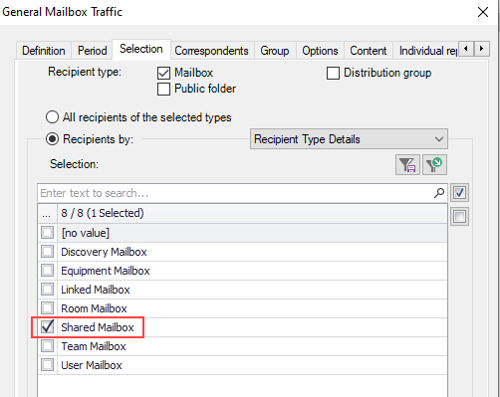
Shared mailboxes can easily be picked up by selecting Exchange recipients by type. If you have switched to a hybrid environment, you will be able to select shared mailboxes on site and in Office 365 simultaneously.
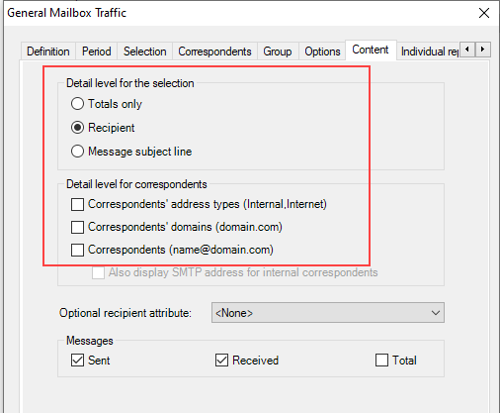
You can set the detail level of your report at will, from Totals to Message subject line, in the General Mailbox Traffic report template. It is even possible to display the SMTP domain of correspondents or their full email address.
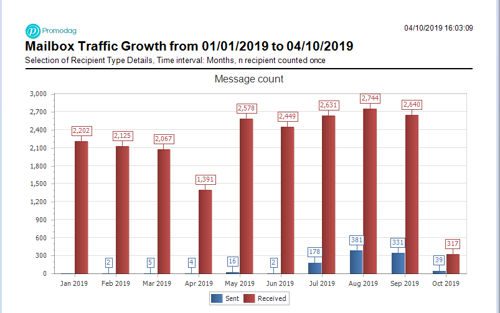
But that's not all: you can also easily produce a graph showing the traffic evolution for shared mailboxes by time interval.
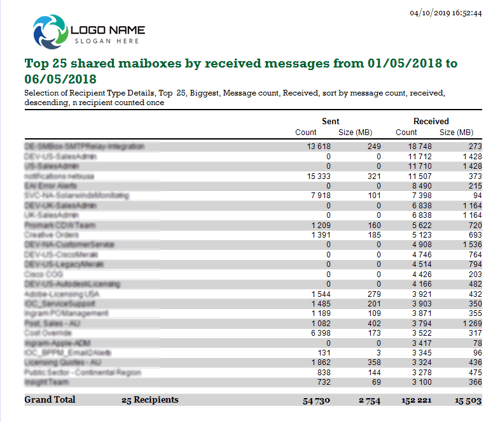
It is also possible, among other things, to produce a report of the first n shared mailboxes by number of received messages. And all these reports are fully customizable - using your company logo and your own graphic charter for example - and their distribution can be automated.
Conclusion
Promodag Reports clearly beats the native Office 365 and the vast majority of the competing products when it comes to reporting on the Office 365 Shared Mailboxes, both in terms of usability and available detail level. If you try it, you'll love it. Download a 45-day free trial or upgrade to the latest version if you are an existing customer. We are open to comments or suggestions, so please do not hesitate to send us a message or contact our support.
Frequently Asked Questions
Can the native Microsoft 365 admin center report on shared mailbox email activity?
How do I select shared mailboxes in Promodag Reports?
Shared mailboxes can easily be selected in Promodag Reports by filtering Exchange recipients by type using the Recipient Type Details attribute. This allows you to specifically target shared mailboxes for reporting. If you have a hybrid environment, you can select shared mailboxes on-premises and in Office 365 simultaneously.
What level of detail can I get in shared mailbox activity reports?
Promodag Reports allows you to set the detail level from totals down to individual message subject lines in the General Mailbox Traffic report template. You can display SMTP domains of correspondents or their full email addresses, providing comprehensive visibility into shared mailbox communications that most third-party products cannot offer.
Can I track shared mailbox traffic growth over time?
Yes, Promodag Reports can produce graphs showing traffic evolution for shared mailboxes by time interval using the Mailbox Traffic Growth report. This allows you to track how shared mailbox usage changes over time and identify trends in communication patterns.
How can I identify the most active shared mailboxes?
You can produce a report of the top N shared mailboxes by number of received or sent messages using the Mailbox by Traffic Level report. This helps identify which shared mailboxes are most actively used in your organization and can inform resource allocation and management decisions.
Can I customize shared mailbox reports with my company branding?
Yes, all Promodag Reports including shared mailbox reports are fully customizable. You can use your company logo and your own graphic charter to brand the reports. Additionally, report distribution can be automated, allowing you to schedule regular shared mailbox activity reports.
Does Promodag Reports work with hybrid Exchange environments for shared mailboxes?
Yes, Promodag Reports fully supports hybrid environments. You can select and report on shared mailboxes that exist on-premises and in Office 365 simultaneously, providing comprehensive visibility across your entire Exchange infrastructure regardless of where the shared mailboxes are hosted.
What makes Promodag Reports better than native Office 365 reporting for shared mailboxes?
Promodag Reports beats native Office 365 reporting by actually supporting shared mailboxes (which the native report doesn't), providing drill-down capability to message subject lines, offering customizable detail levels, supporting traffic growth analysis, enabling top mailbox identification, and allowing full customization with company branding and automated distribution.
Comprehensive Exchange reporting made simple for Office 365, On-Premise, and Hybrid environments
Start your free 45-day trial of Promodag Reports